Reporting at Scaler
A readiness score for every report, so teams know what to fix before GRESB is due.
- Problem
- Reporting is the most important thing clients do in Scaler, but it was hidden under Data Collection with no way to tell if a report was ready.
- What I did
- I led strategy, IA and design of a Reports module with readiness per report and a three-step preparation flow. The Reporting and Analytics team built it.
- Result
- It shipped behind a feature flag ahead of the June 2026 reporting season.
Outliers checked before generation.
Teams review warnings and check outliers against GRESB’s statistical model before a report is generated.
Reporting was hidden inside Data Collection.
Reporting is the most important thing clients do in Scaler, but it sat third in the Data Collection menu. The page listed the reports active for that portfolio, each with an upload status, and said nothing about whether the data behind it was ready or what was blocking it.
Reports and saved reports also lived on separate pages, and some clients couldn’t find the GRESB modeller at all.
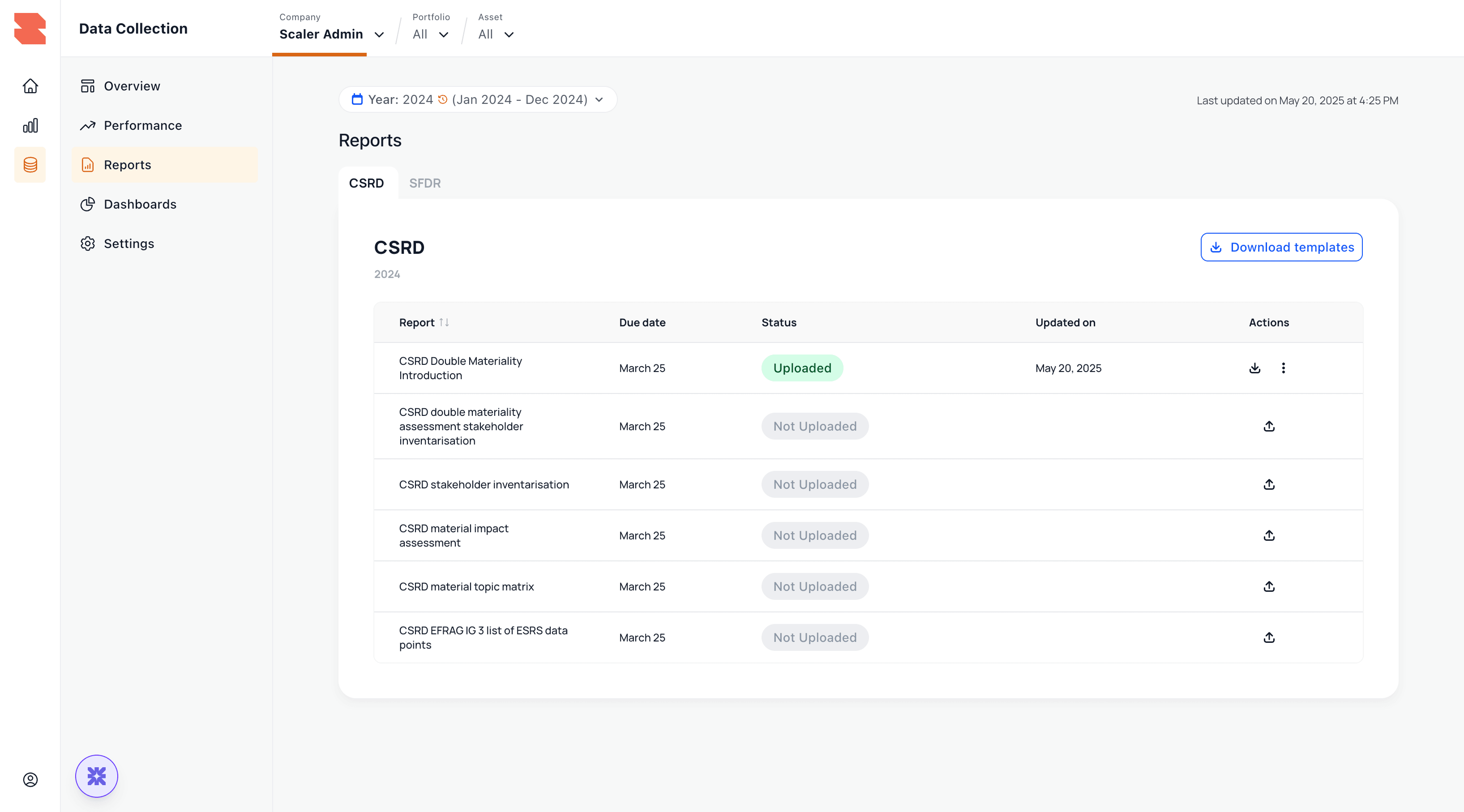
GRESB season ran on spreadsheets and Slack.
In Europe, GRESB is the submission everyone cares about. In January the reporting team asked for a project-management page to help run reporting season, and in February our team described one client as being in the “organised chaos” of GRESB season. On top of that, the account team kept reporting clients editing the wrong reporting year, because the year selector was so easy to miss.
What the old flow lacked
Readiness
Nobody could tell whether the data behind a report was complete before generating it.
A way to fix
When data was missing, nothing pointed to which assets or fields.
Guardrails
Generating a report was a single button, and it worked whether the numbers were right or not.
A home
Reports was the third item in the Data Collection menu.
Form a hypothesis.
If a team can see, per framework, how ready their data is and what is blocking it, and the platform refuses to generate a final report until that is resolved, then reporting season becomes a managed process instead of a scramble, and wrong submissions stop.
Align on the questions that drive us.
- A team opens Reports and knows in ten seconds what to work on first?
- Nobody generates a final report with incomplete data, without the platform getting in the way of drafts?
- The reporting year is impossible to mistake?
- A head of ESG can run the season from one page instead of a spreadsheet?
Reporting became a readiness score per framework.
The old flow treated a report as a file you uploaded and downloaded. The new one is built around the season. Teams watch a readiness score for each framework, fix whatever is blocking it, and generate the report once it reaches 100.
Reports became its own module.
Three decisions shaped the design.
The overview shows how ready each framework is, with completion, active reports and deadlines on the same screen. A framework at 100 looks clearly different from one at 25, and a data error shows up in red.
A better file list with a status column. Readiness problems would have stayed hidden until someone tried to generate a report.
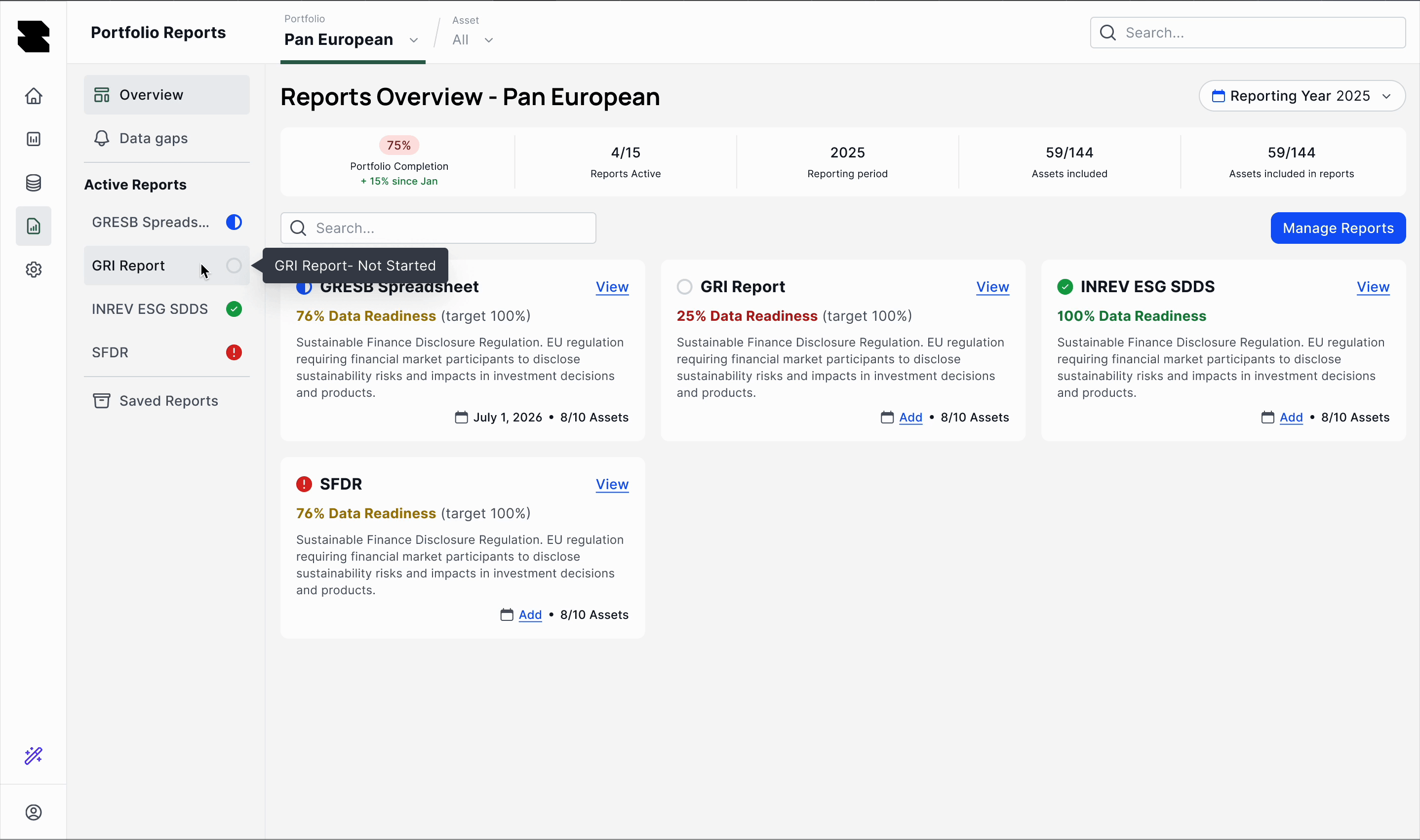
Preparing a report takes three steps. Teams get readiness to 100, optimise, and then generate and save. They need drafts early in the season to see where they stand, so drafts are allowed with a warning, but finals are not. The optimise step asks teams to review warnings, check outliers with GRESB’s statistical outlier model and analyse performance. Each check can be skipped, but the platform first lists exactly what the report will miss.
Blocking everything below 100. It’s a cleaner rule, but teams couldn’t have started early, and they would have gone back to exporting drafts from the old table.
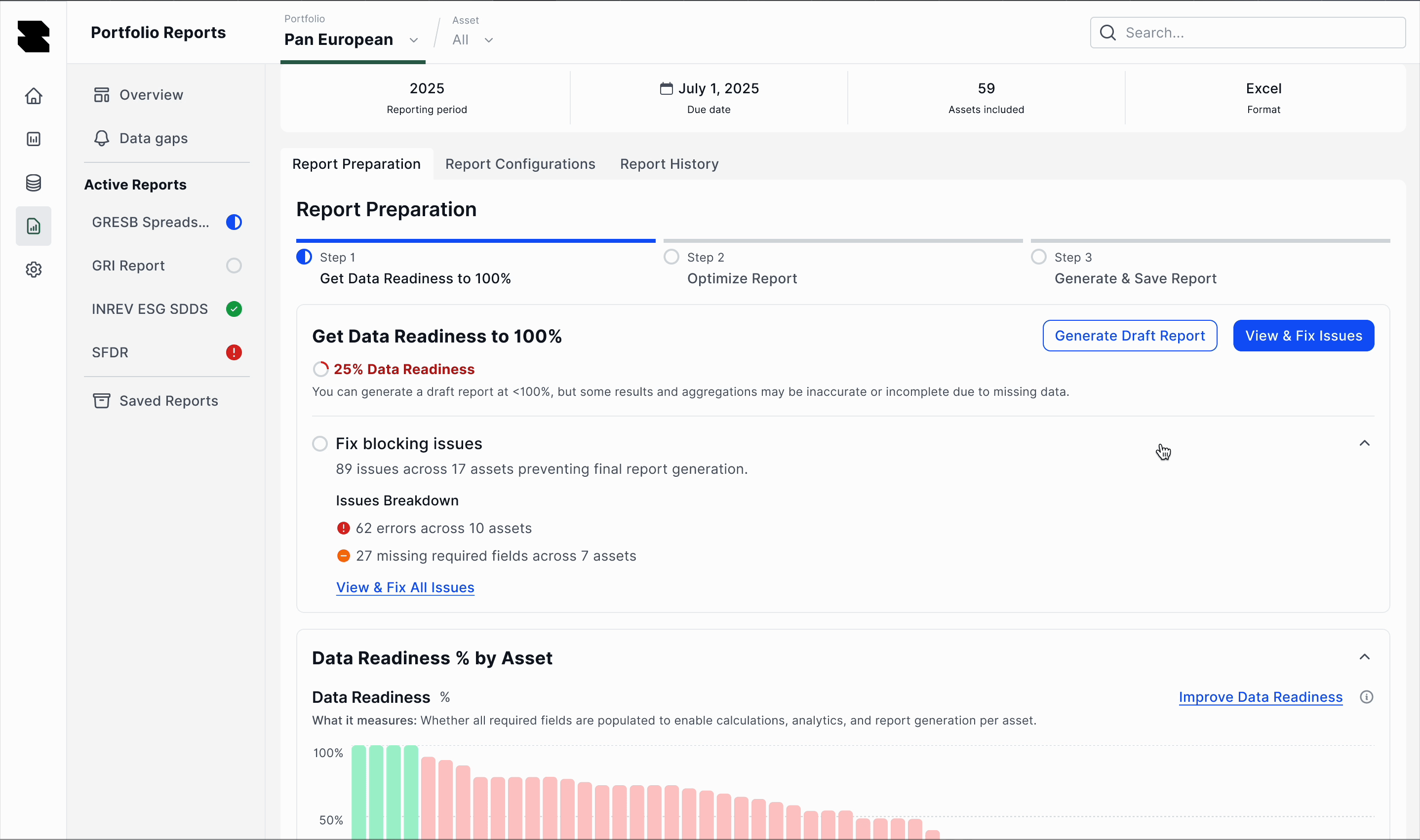
Each report shows its blocking issues, split into errors and missing data, along with the assets affected. Teams can open the gaps for that report, filter them and download the alert details to fix everything in bulk. It’s the same loop as Portfolio Alerts, now tied to the report it is blocking.
A readiness number on its own. Teams would know the report wasn’t ready, but not what to fix.
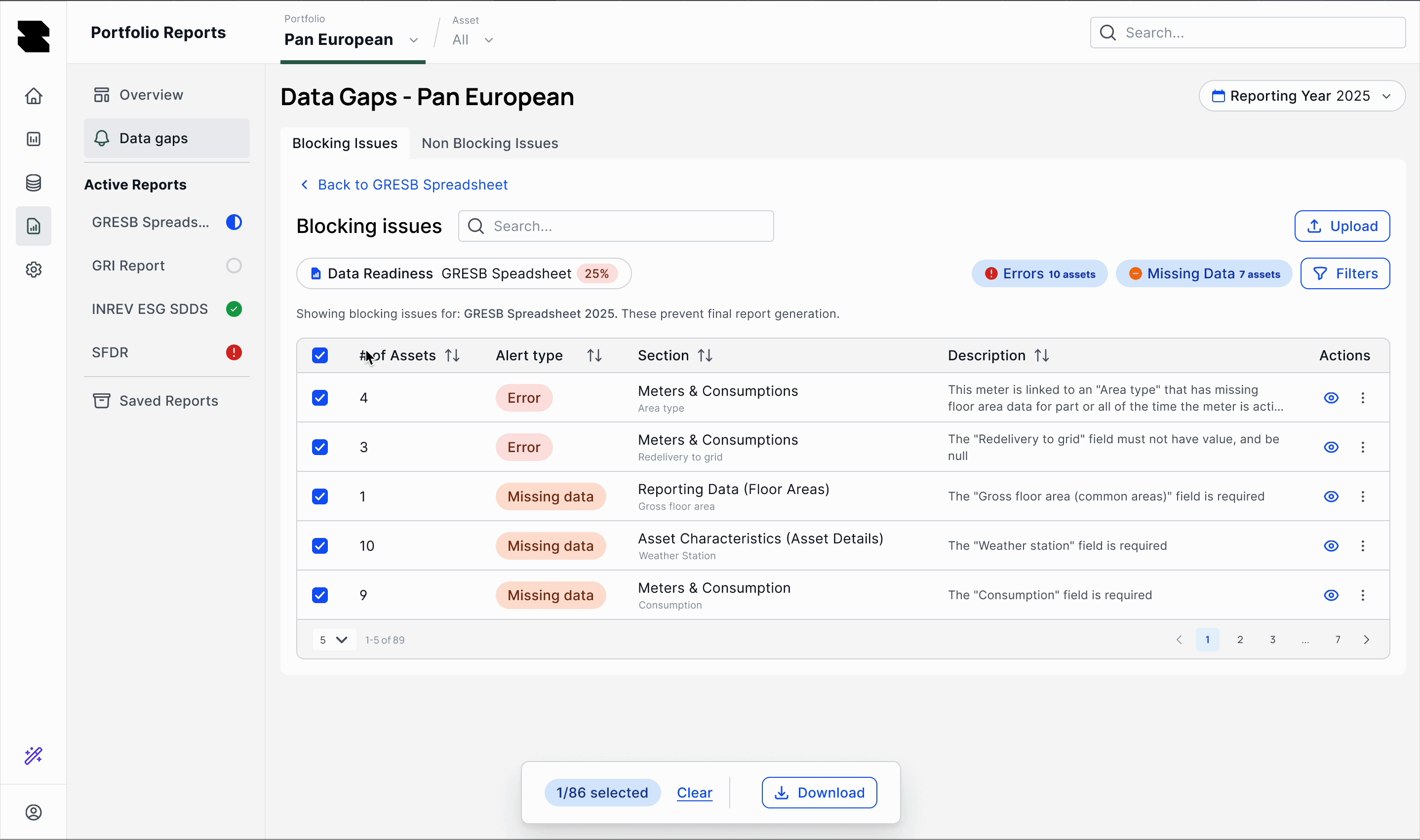
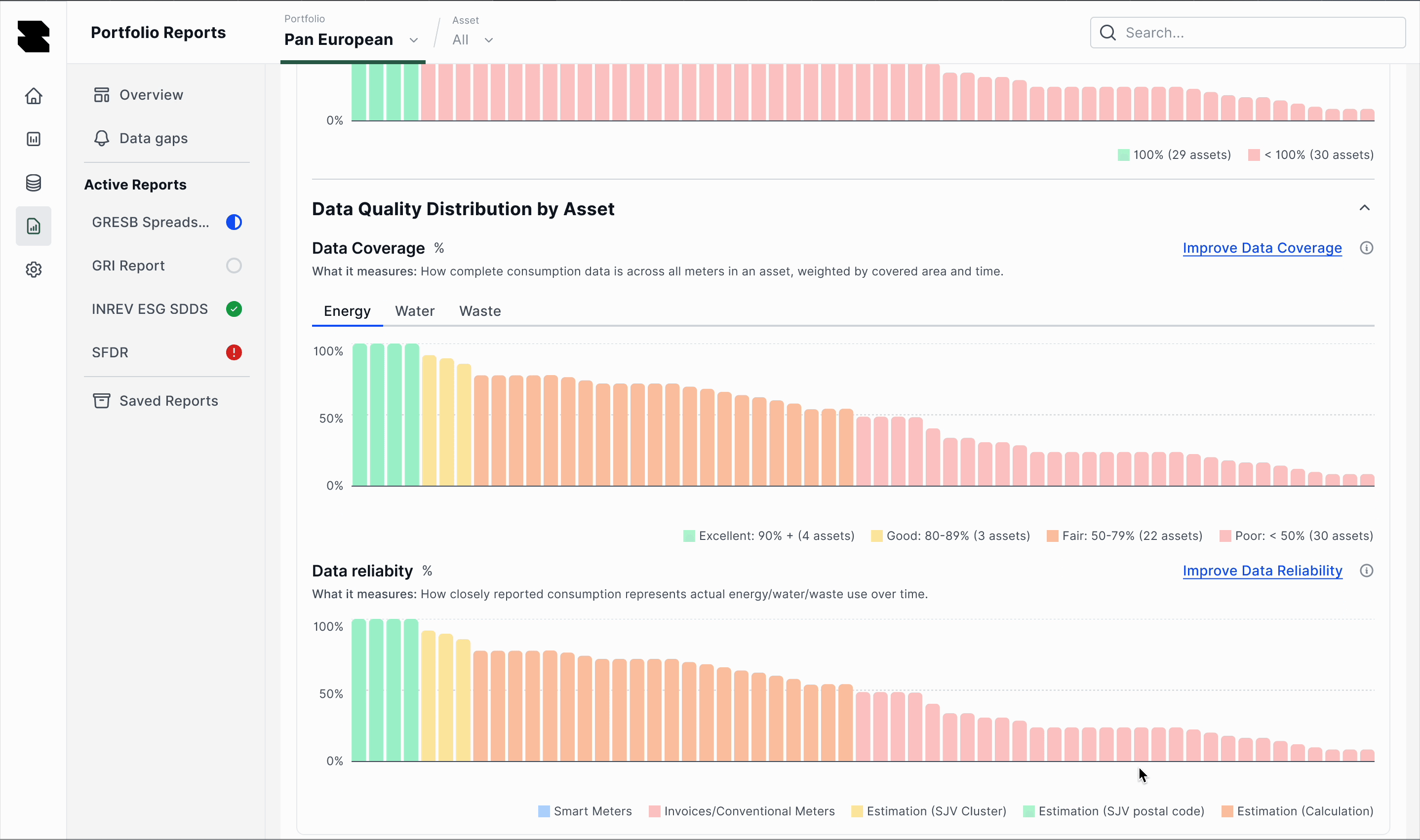
Data gaps and quality, per asset.
When readiness falls short, the distribution view shows which assets and utilities are missing data, each with an action to fix it.
Shipped for the 2026 season.
It shipped behind a feature flag in June 2026, in time for the reporting-season testing kick-off. Because it was built on the Aurora design system, it matched the rest of the platform from day one.
See what is ready
Readiness per framework, with every blocking issue counted and linked.
Generate once the data is complete
Teams can skip the optimisation checks, but only after the platform lists exactly what they are skipping.
Internal reception was strong, but the reporting season is the real test. I hadn’t measured outcomes by the time I left, so the numbers here describe what shipped.
Two things I'd change.
The reporting year problem is only half solved. The new module shows the year clearly in the header, but ending wrong-year edits for good needs a year setting for the whole platform, which sits outside this module. That would have been my next project.
The reporting team asked for a project-management page for the season, and it wasn’t built while I was there. I’d have pushed for it in the first release, because running the season was the part Account Ops struggled with most.