Portfolio Alerts at Scaler
How teams went from opening 200 assets one by one to seeing every gap on one screen.
- Problem
- Finding data gaps in a 200-asset portfolio meant opening every single asset.
- What I did
- I led research, IA and design of a portfolio-wide Alerts view with bulk export and validated re-import. The Data Collection team built it.
- Result
- Every gap now sits on one screen instead of across 200 asset pages, which is the workflow Evora told us they needed.
Teams checked 200 assets one by one.
A fund preparing a GRESB or SFDR submission needs every asset to be complete. The platform only showed completeness one asset at a time, so for a 200-asset portfolio that meant opening each asset and reading all 47 fields to find what was missing. Teams spent days just auditing before they could fix anything.
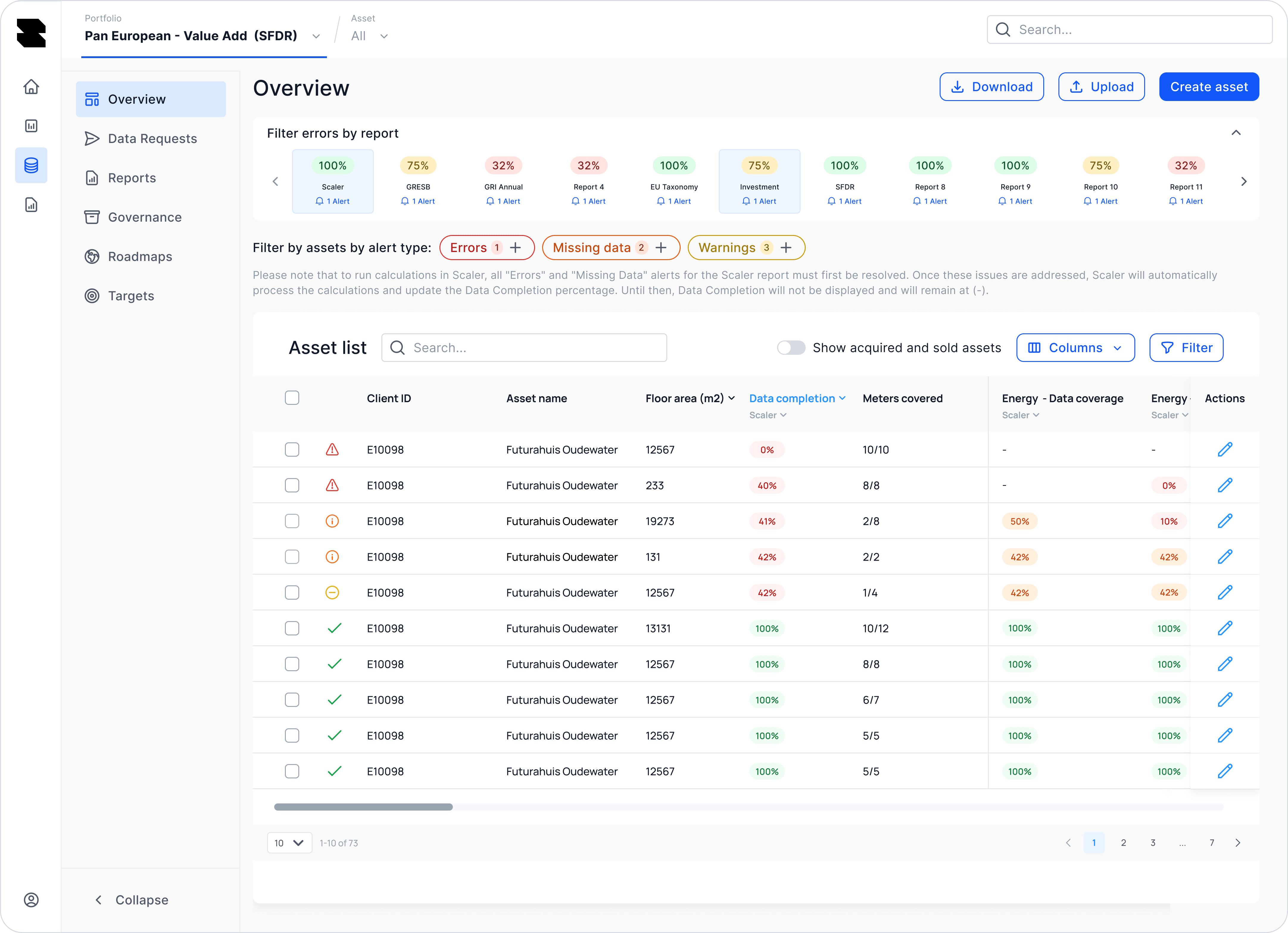
Which assets are missing energy data for GRESB?
Every ESG lead asks that question in February. The only screen that could answer it was the full asset list, with two hundred rows and a dozen columns to dig through. In a December call, Evora put it plainly.
“We need a portfolio-level overview instead of clicking into each asset to see what’s missing.”
What the old flow lacked
A cross-asset view
Gaps only showed up per asset, never across the portfolio.
A framework lens
Teams couldn’t filter to what was blocking GRESB or SFDR.
A bulk path
Every fix was a separate form save, so two thousand gaps meant two thousand saves.
A finish line
Nothing told a team when they had reached 100% and could stop.
Almost every goal needed the same filtered list.
Before designing anything, I mapped what teams were trying to do in each part of the platform. Nearly every goal came back to the same list of alerts, just with a different filter.
What we heard
Gaps are a portfolio problem
Teams think in terms of “my assets” and work through them as a queue.
The framework is the filter
Nobody fixes everything at once. Teams fix whatever blocks the next submission.
They will fix it in Excel anyway
Every team already exported to spreadsheets to work offline, so the platform had to work with that habit.
Form a hypothesis.
If every gap in a portfolio is one filterable table, and a team can fix a filtered set in bulk and bring it back validated, then reaching 100% before a deadline becomes a queue to work through instead of an audit to survive.
Align on the questions that drive us.
- An ESG lead can answer “what blocks my GRESB submission?” in one filter?
- Two thousand alerts still read as a queue someone can work through?
- A team fixes a hundred gaps in the tool they already use, without the platform losing the data?
- Everyone can see when a portfolio is done?
Teams needed one list they could filter and fix in bulk.
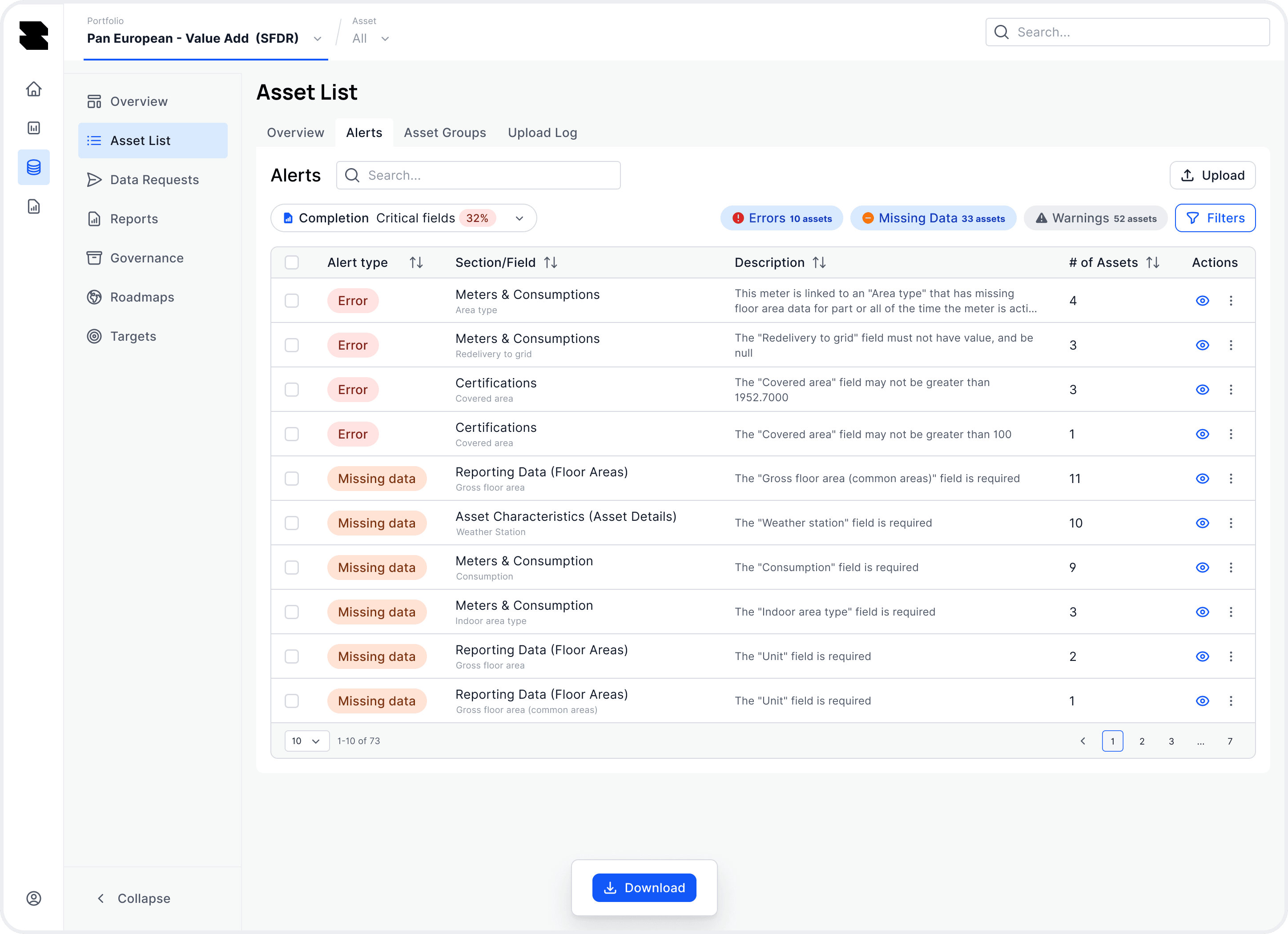
Teams see every gap on one screen and filter down to what’s blocking them, then fix those rows in bulk and re-import. Each gap is marked as an error, missing data or a warning, so it’s clear what to fix first.
Three decisions shaped the design.
Teams see alerts as data quality work, and putting them under settings or notifications would have hidden that work. I put the tab next to Asset List and Map View, where portfolio-level work already happens, and each row counts the assets affected so the list stays short.
An alerts inbox. It would have felt familiar, but it turns gaps into messages people dismiss.
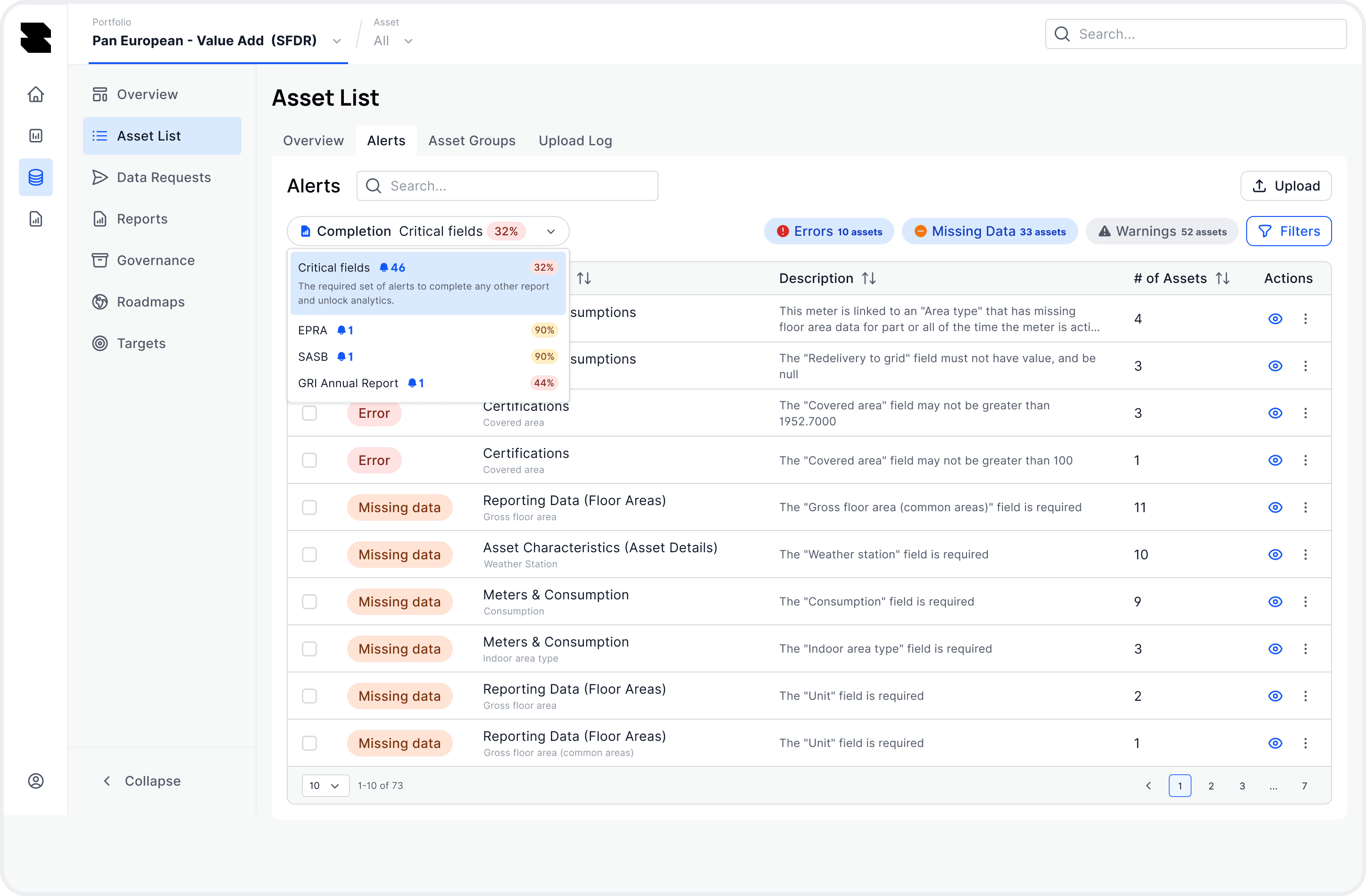
Two hundred assets and ten alert types add up to two thousand rows, which nobody can work through. Filters for framework and data category cut that down, so a team fixing energy gaps for GRESB only sees those.
One complete table with sorting. Everything would be there, but nobody would find what they needed.
Nobody fixes two thousand gaps in a web form. The export keeps the full context, so teams can fix the data offline in Excel, and re-import checks every row against existing asset IDs and field names before anything is saved. Teams keep working the way they already do, and the platform still ends up holding the final data.
The export dialog says what’s in the file before you download it.
Inline editing only. It works for one or two fixes, but most fixes happen in bulk, and that work would have stayed in spreadsheets the platform never saw.
Teams see when the portfolio is complete.
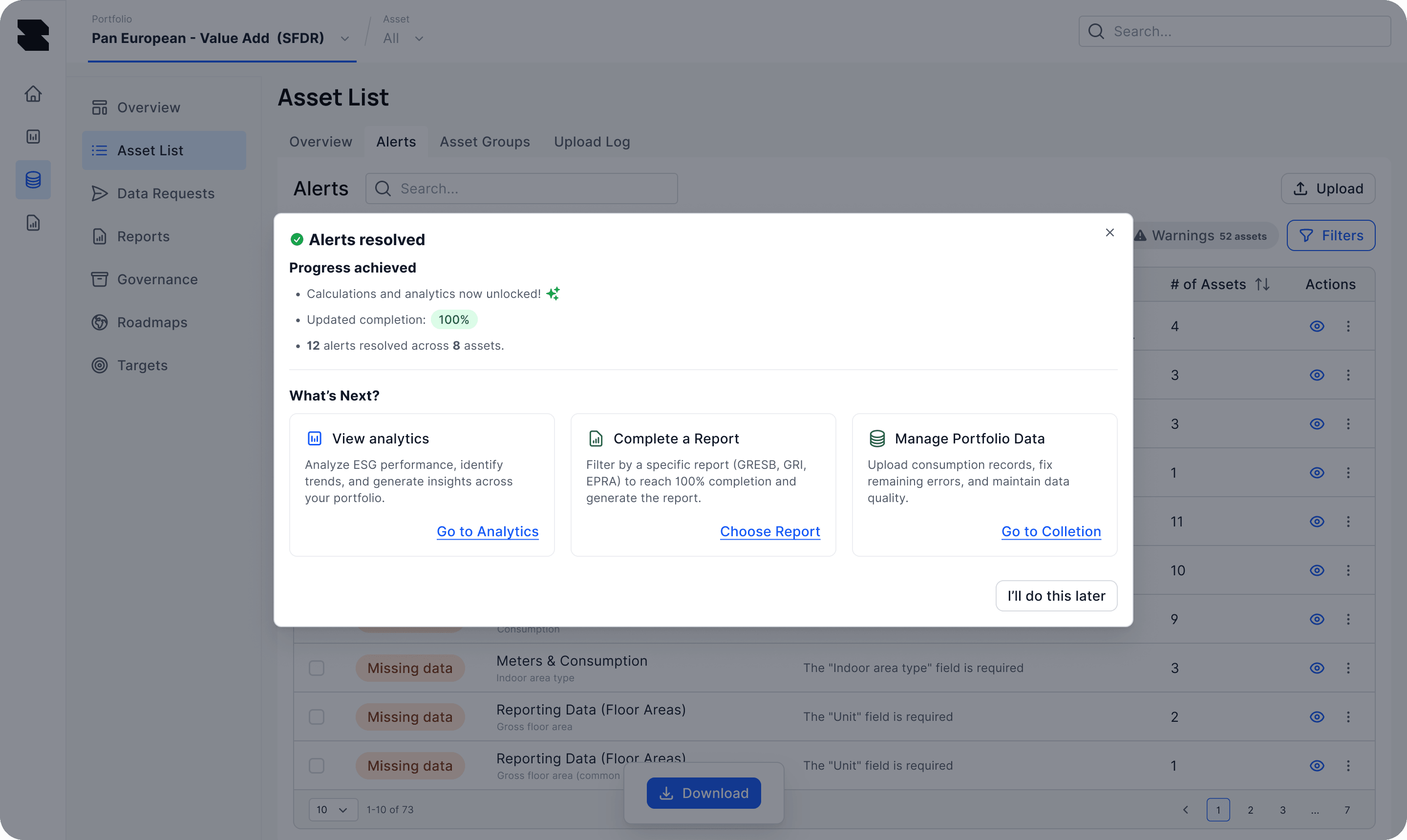
When a re-import clears the queue, a dialog confirms it and points to what to do next.
We shipped to staging in December and to production in January 2026.
Import validation was the hardest part. One wrong row could corrupt client data, so engineering and I spent most of December working out what re-import should check and how it should fail. On 4 December, Evora confirmed the approach solved their problem, and production rollout started in January 2026.
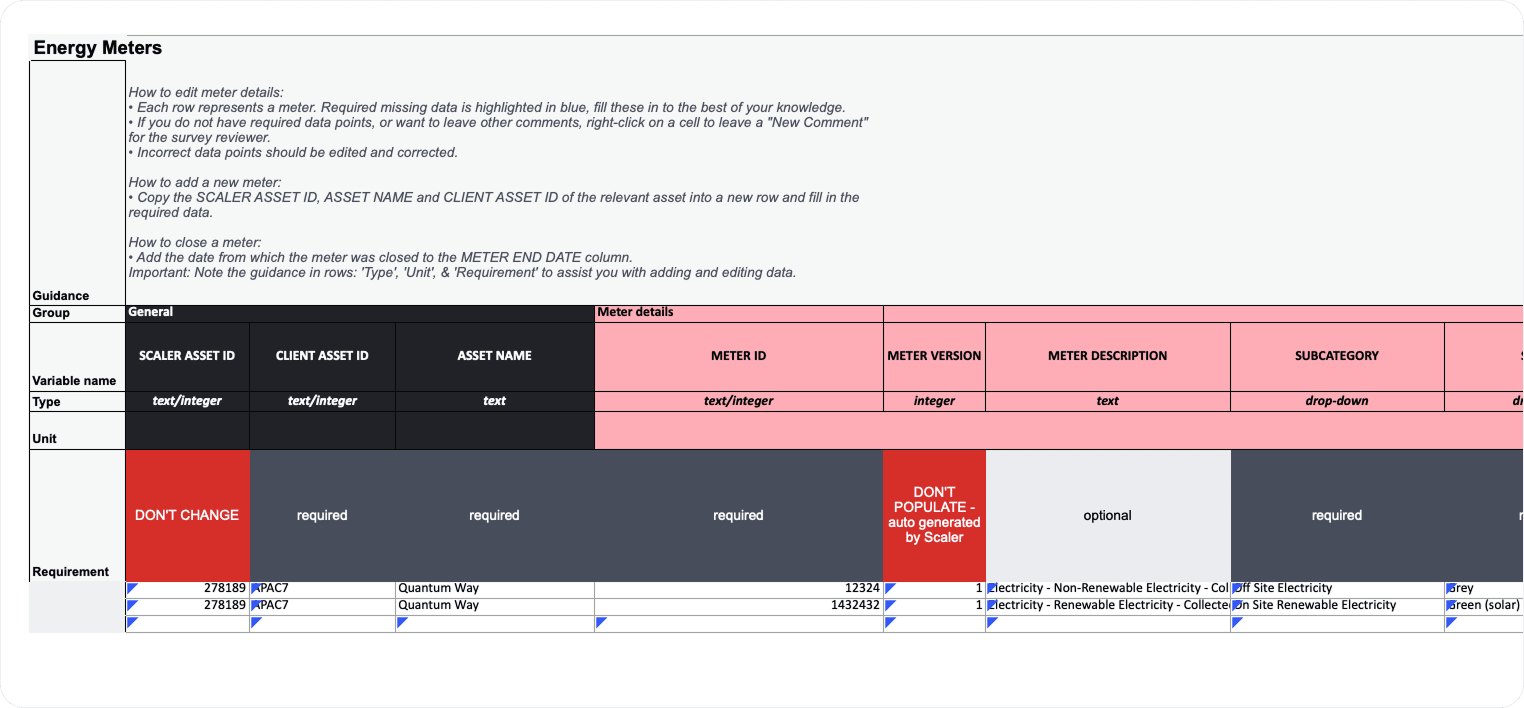
Fix in bulk, come back validated
The export template includes guidance, the required fields and the asset IDs the import checks against.
What's next, and what I'd change.
Next I’d add completion trends, so a team can watch the queue shrink over time, and alert subscriptions, so whoever owns a section hears when something in it breaks.
I’d also have shipped the “Alerts resolved” moment earlier. It was a late addition, and it turned out to be the part of the flow people mention most. After clearing a queue, people want to know they’re done.